EXERCISE in IMAGE/INE:Video
Erase
NOTE: You may need to adjust
your Min and Max and panX and panY, not shown below.
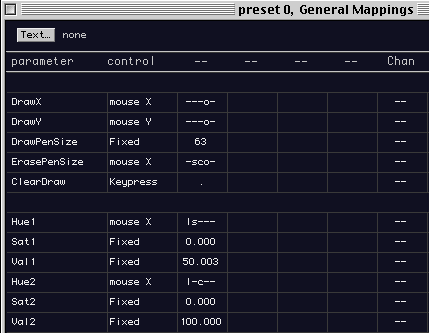
Foreground:
Draw (F8)
Background: Movie (shift + F2)
Displace Src: Buffer (control + F3)
Color1:
Gray
(Saturation1, fixed, 0.00)
(Value1, fixed, 50.00)
Color2:
White
(Saturation2, fixed, 0.00)
(Value2, fixed, 100)
DrawX:
mouseX, ---o-
DrawY: mouseY, ---o-
{this command allows the "option key
+ mouse" to do the drawing}
Draw PenSize:
fixed, 63
Clear Draw: Keypress "."
{this command allows the "period key"
to clear the drawing in order to start over}
You are ready to begin:
Hit "command + G" to
begin performance mode.
Your QT Movie should be playing as normal
Hold down "option" while drawing with your mouse.
Your drawing strokes should reveal the moving pict file in your
Buffer.
To begin again type "." (a period).
< >