EXERCISE in IMAGE/INE: Video Erase
OBJECTIVE: This exercise will create two layers of moving images, the top layer is a quicktime movie, and the lower image is a pict file in your buffer that is moving. The object is to erase the top layer to reveal the bottom layer.
From the QT Movies window, import a 320x240 .mov file from Premier (or other QT Movie program).
In the Buffer window, import a .pict file
640x480 from a digital imaging program such as Photoshop.
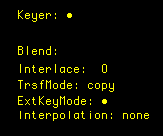
Your monitor should be set to the following by pressing "k" and "x":
Keyer: "on"
Ex Mode: "on"
In the Mapping Window the following should be set:
PanX: Random, 2.0
PanY: Random, 1.5