IMAGE/INE Basics
Before Getting Started...
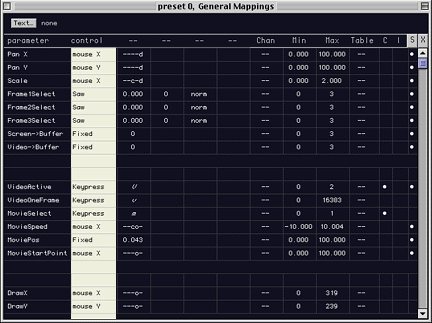
The Control column (highlighted in white) allows you to set the type of input device you want to trigger effects such as MovieSpeed; or alternatively offer fixed and continuous commands. Types of control input devices to choose from include Midi, keyboard, mouse, L/R audio (from CD, Mic, etc.). For instance: Do you want a keyboard command or a midi device to control the MovieSpeed?
There are several general types of commands:
Continuous: Use continuous commands when you want to go from quite to loud, whit to black continuously. Midi allows values between 0-127, a mouse uses an x,y axis (or values between 0-16383).
Toggle: Uses on/off. For instance when you press a "k" keying is "on", when you press "k" again, keying is "off."
Trigger: Uses "on the downtroke." For instance while a "middle c" is pressed you see a circle, when you lift off "middle c", the circle also disappears.
Select: Selects an entirely new event. For instance going to a new Preset with a new set of commands.
If you don't want Controls to be interactive, they can be "fixed" or set to "random" or several types of "LFO's."
Fixed: an effect is always on or off and no interactivity will change it. For instance you may want your MovieSpeed to be fixed to a normal speed without effects.
Random: a parameter can randomly move through values. For instance MovieSpeed can be randomly changing frame rates (slowing down, speeding up) unexpectedly.
LFO's: It will assign sinewaves, sawtooths, etc. to your parameters. For instance if you select a sinewave to your MovieSpeed it will start out fast, then slow down as it gets to the center of the movie and then progressively speed up again, just like a sinewave.
< >