Malicious Mobile Code Part II
Active X controls
ActiveX is a group of Microsoft software development tools that allow Windows programs to work across networks. ActiveX is an extension of Microsoft's 32-bit Windows API and Component Object Model (COM) models, and is now covered under the umbrella of the Distributed COM (DCOM) architecture. DCOM encompasses all programming tools that allow a Windows client to use a server program over a network. This distributed programming architecture is eventually culminating in Microsoft's .NET initiative. ActiveX programs can be installed, used, and executed by hundreds of applications, including Microsoft's Outlook, Outlook Express, and Office product lines.
An ActiveX control is an executable program that can be automatically delivered over the Internet where it usually runs within a browser. Contrasted against Java applets, which are created in their own special language, ActiveX controls can be written in many different languages, including C++, Visual Basic, Visual C++, Delphi, Powersoft, Java, C-Sharp (C#), and Visual J++. And because ActiveX controls are based on the OLE specification, controls written in one language can be re-used within controls written in another language. ActiveX controls are compiled into fast 32-bit machine language for Windows platforms. This means they can run only on systems that work with the Win32 API and lose the portability advantaged gained by Java.
When you accept a control for the first time, the control is downloaded to your computer and the appropriate registry entries are created. ActiveX controls usually have the file extension .OCX, which stands for OLE Control, but a control could have any extension.
Scripting languages, like VBScript, JScript, JavaScript, Python, PowerScript, Tck/Tk, and Perl, can be used within a web page to direct the functionality of an ActiveX control. ActiveX controls can be written to run differently based upon the parameters passed to it by the scripting language that calls it. For example, a web site can start the ActiveX downloading process as soon as the web page loads, or tell the control to manipulate different files based on end-user input.
Safe for Scripting and Safe for Initialization
ActiveX controls can be defined as Safe for Scripting and Safe for Initialization by the software publisher. By designating the control as safe, the vendor is saying that the control cannot be used maliciously and is safe to be manipulated by other scripting languages. Safe for Initialization means that no matter what values are passed to the control during its startup, it cannot do damage to a user's system. Safe for Scripting means that the control cannot be used maliciously no matter how its manipulated. Controls that can create, read, or write files, or write to the registry are not considered explicitly safe, unless their actions are predetermined and specific. There is no standard way for a vendor to test the safety of their code. As we will see later, it's difficult for a vendor to consider all the possibilities of their program's interactions.
Using/Activating ActiveX Controls
Web developers include an <OBJECT> tag within their HMTL page (see example below) to automatically download a control to the browser. When you surf across a web page with a signed ActiveX control, the browser reviews CLASSID s stored in the registry to see if the control is already installed. If not, the web page's CODEBASE attribute tells the browser where the appropriate control can be found. If the browser still cannot find the control from the location specified by the CODEBASE attribute, it can try contacting one of several servers where signed controls are registered. The server then checks a list of all controls and their CLASSIDs that have been registered with it and tells the browser where the control can be downloaded. This, of course, is invisible to the end user and happens in seconds.
<HTML>
<HEAD>
<TITLE> Draw a Square </TITLE>
</HEAD>
<BODY>
Here is a sample square from ActiveX:
<OBJECT ID="Sample"CODEBASE="http://www.roger.com/controls/Sample.ocx"
HEIGHT="101" WIDTH="101"
CLASSID="clsid:0342D101-2EE9-1BAF-34565634EB71">
<PARAM NAME="Version" VALUE=45445">
<PARAM NAME="ExtentX" VALUE="3001">
<PARAM NAME="ExtentY" VALUE="2445">
</OBJECT>
</BODY>
</HTML>
ActiveX Security Model
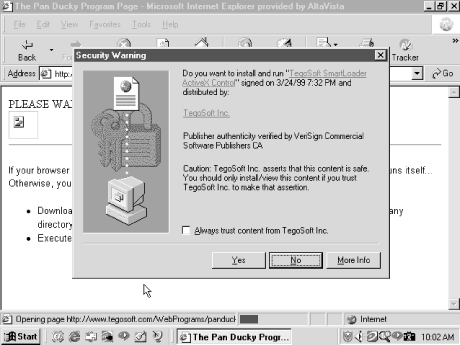
ActiveX's default model doesn't run untrusted code. The defining question is how ActiveX determines what is untrusted code. In many cases, it doesn't, you do. When you download an ActiveX control, Internet Explorer checks for the existence of a digital signature to verify its authorship. Depending on the browser's security setting, you may then be asked to accept or deny the control's downloading and execution.
As you are prompted to accept a new, signed control for the first time, the browser will also allow you to accept every control signed by the same author, if you check the Always trust content from box. If you do, future controls from the same author or vendor, now considered trusted publishers, will not result in additional notifications. They will download and execute without warning.
If a control is not signed, you are given the option of accepting or denying it. Microsoft considers all unsigned controls as unsafe. While this can be true, many of the controls you will download are legitimate and safe, yet are unsigned. If you accept, the unsigned control runs and you will not be prompted again for the same control. If you deny the control, the code is not executed (although it has already been downloaded to a temporary file location).
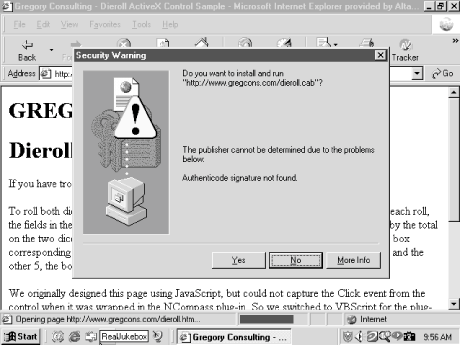
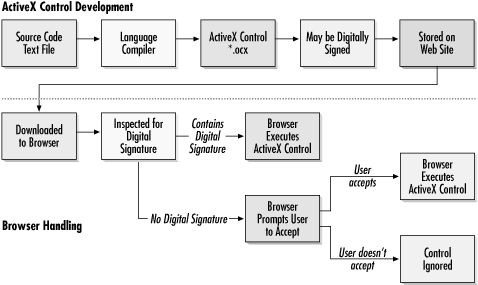
Microsoft's ActiveX security stands (or falls) on whether or not you, or your browser, accepts the code as trusted. It doesn't tell you what system resources the control will access or what it might do. ActiveX's entire security scheme is based upon signed code, security zone policies, and end-user judgment.
Digital Signing and Certificates
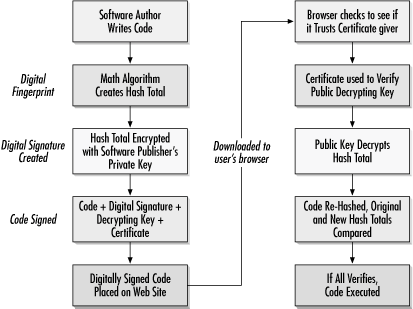
Central to ActiveX's security (and to a lesser extent, Java) is the concept of digital signing. Digital signing is recognized by hundreds of software applications, including Microsoft's Internet Explorer, Outlook, Outlook Express, Office, and Netscape. Digital signatures allow a user to verify, prior to running executable code, that it came from the developer it says it came from; and that nobody else has modified the code. It doesn't guarantee who distributed it or where it ultimately came from. And it doesn't mean the code is bug free or not malicious. Digital signing only authenticates those who created or intended to distribute the code. The code can still be malicious or used maliciously.
Browser Plug-ins (BHO)
A plug-in is merely some code that extends the browser's capabilities, and can be loaded by a user or ActiveX control. When acting as a plug-in, spyware loads automatically whenever the browser starts up, and is able to access all data processed by the browser.
Plug-ins written specifically for Internet Explorer are known as browser helper objects (BHOs), and are currently the preferred platform for spyware programs due to Internet Explorer's popularity. Not all BHOs are malicious, of course. The Google search bar, for example, is a legitimate BHO that allows Internet Explorer users to search www.google.com directly from the browser's window.
Many of the malicious ActiveX controls that we encounter on the Web are browser plug-ins classified as spyware. These programs monitor and record the user's Web surfing activities or otherwise hijack the victim's browser. When spyware is installed, an attacker can watch over your shoulder and look at all of your surfing habits. Spyware can be written and distributed using a variety of mechanisms, including standalone executable programs, ActiveX controls, or plug-ins for the majority of browsers in use today. Once installed, spyware BHOs are difficult to detect and get rid of, because they rarely include a functional uninstall program, and they might even lock the victim out of Internet Explorer's configuration screens. These highly aggressive spyware BHOs sometimes gray out the Internet Explorer menu options needed to remove the malicious software, preventing the user from reconfiguring the browser.
Removal tool:
HijackThis
Exploiting/Examples of ActiveX controls
MySpace Uploader ActiveX Exploited in the Wild
Defending against ActiveX Threats
How to Deal with Common ActiveX Issues
Java Applets
Java, developed by Sun Microsystems (http://www.sun.com), is a programming language just like any other you might be familiar with. Although it is not C++, it was intentionally written with a similar syntax to decrease the learning curves of the many C++ programmers today. Despite popular belief, Java applications do not need a browser to run, just a Java runtime environment. Sun has developed a free Java runtime environment to help entrench Java within corporate shops.
A Java Virtual Machine (JVM) is a software-based virtual environment where Java applications can exist and manipulate computer resources. The JVM is specifically written for each computer platform (usually by the operating system or browser vendor), as it handles and translates requests from Java programs to the operating system for computer resources. The JVM allows Java programmers to forget about the intricate details of how a particular operating system platform accesses memory or files. They can write programs in Java, and the JVM will translate the commands into requests the operating system can understand.
A Java-enabled HTML page must include special tag indicators to link the Java applet into the HTML page. When Internet Explorer reads the HTML code, the referenced Java applet is automatically downloaded and executed. The following three HTML tags can be used to load a Java applet, depending on your browser and version:
· <APPLET CODE=> and </APPLET>
· <OBJECT> and </OBJECT>
· <EMBED> and </EMBED>
<HTML>
<HEAD>
<TITLE> Draw a Square </TITLE>
</HEAD>
<BODY>
Here is a sample square:
<APPLET CODE="Sample.class" HEIGHT=101 WIDTH=101
</APPLET>
<OBJECT codetype="application/java" classid="java:Sample.class"
width="101" height="101">
</OBJECT>
<EMBED SRC="sample.class" WIDTH="101" HEIGHT="101">
</EMBED>
</BODY>
</HTML>
Java applet
programs use a special subset of the Java programming language customized to run
within compatible web browsers. There are lots of browsers that currently
support Java including Microsoft Internet Explorer ,
Netscape Navigator,
Opera,
and Sun's own HotJava.
,
Netscape Navigator,
Opera,
and Sun's own HotJava.
Java Security
Java's original security model, released in JDK 1.0, is a multitiered protected environment called the sandbox. The sandbox severely limits what remotely accessed applets can do, while allowing locally launched and trusted applets full system access. Because a Java applet couldn't manipulate the local file system, it was virtually impossible for any company to write a Java applet of any serious consequence. You can't write a spreadsheet or word processing program because a Java applet can't manipulate local data in any way. JDK version 1.1 allows Java applets to be "signed" and trusted. Unsigned applets are treated as untrusted and placed in the restrictive security sandbox. Signed code, however, can be trusted by the user and gain full access to the user's system. JDK 1.2 (Java 2) includes an enhanced signed security model and the Access Controller . Applets authenticated and trusted can have complete run of the user's system or utilize the Access Controller to be granted varying, preassigned system resources. Unsigned and untrusted applets still run in the protective sandbox.
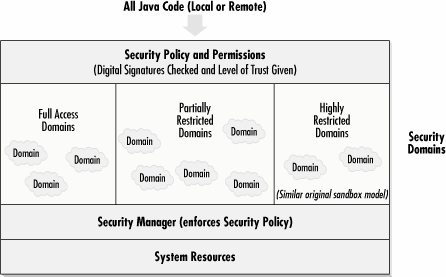
Article on Java security model
Java Exploits
Attacks within the sandbox
Social engineering applets
Java viruses and Trojans
Applets that break the sandbox
Defending Against Malicious Java Applets
ActiveX is often thought of as a Microsoft Java clone. It isn't. Without the common goal of being optimized for Internet component downloading, the two platforms don't share much in common. Here are some key differences:
· An ActiveX object is compiled, not interpreted. This means ActiveX programs can run extremely fast compared to Java programs.
· ActiveX controls can be made with many different languages. Java applets can only be made by Java.
· ActiveX controls can do more than Java applets.
· ActiveX doesn't have the platform independence of Java.
· ActiveX controls only work in Microsoft's Internet Explorer browser (or with Netscape's browser with an ActiveX plug-in).
· With ActiveX there is no difference between the security rights given to local or remote programs.